 Kibitz
For club players, coaches and casual games
Play on a real board. Kibitz writes the moves.
Put your iPhone on a small stand beside the board and start playing. Kibitz watches from the side, recognizes every move and builds the game record as you go — ready to share as PGN or analyse on Lichess.
Coming to the App Store for iPhone.
How it works
No scoresheet, no pen, no special board.
Any ordinary set works. The phone stands at the side, where it doesn't get in the way of either player.
Set the phone beside the board
A small tripod or phone stand at the edge of the table is enough. Kibitz finds the board by itself and zooms in until it fills the picture.
Play as you normally would
Once no hand is over the board, Kibitz compares what it sees with every legal move and writes the right one down — with a short sound, or spoken aloud if you like.
Review, share, analyse
After the game, step through it with a photo of every move, fix anything that looks off, and send it to Lichess or any chess app as PGN.
It asks instead of guessing
A hand in the picture, an awkward angle, a piece placed off-centre — when Kibitz is less than sure, it shows the two or three moves it's considering and you tap the right one. A wrong move silently written down is worse than a question.
Recognition runs on your phone
Board and piece recognition runs entirely on your iPhone. No video is stored or uploaded. Move photos are shared only if you choose to help improve recognition, and a game only goes to Lichess when you send it there.
What you get
Everything you'd want from a scoresheet, and a few things it can't do.
Works from the side
No camera rig above the table. Kibitz is trained on boards filmed at a low angle, the way a phone on a stand sees them.
A photo of every move
Each move keeps a small picture of the board, so you can check a doubtful move against what actually happened — and correct it with two taps.
One tap to Lichess
Upload a finished game for analysis, with or without a Lichess account. Switch on automatic upload and every game lands there by itself.
PGN export
Share or copy the game as standard PGN, with player names, event and date, for any chess app or database.
A screen for spectators
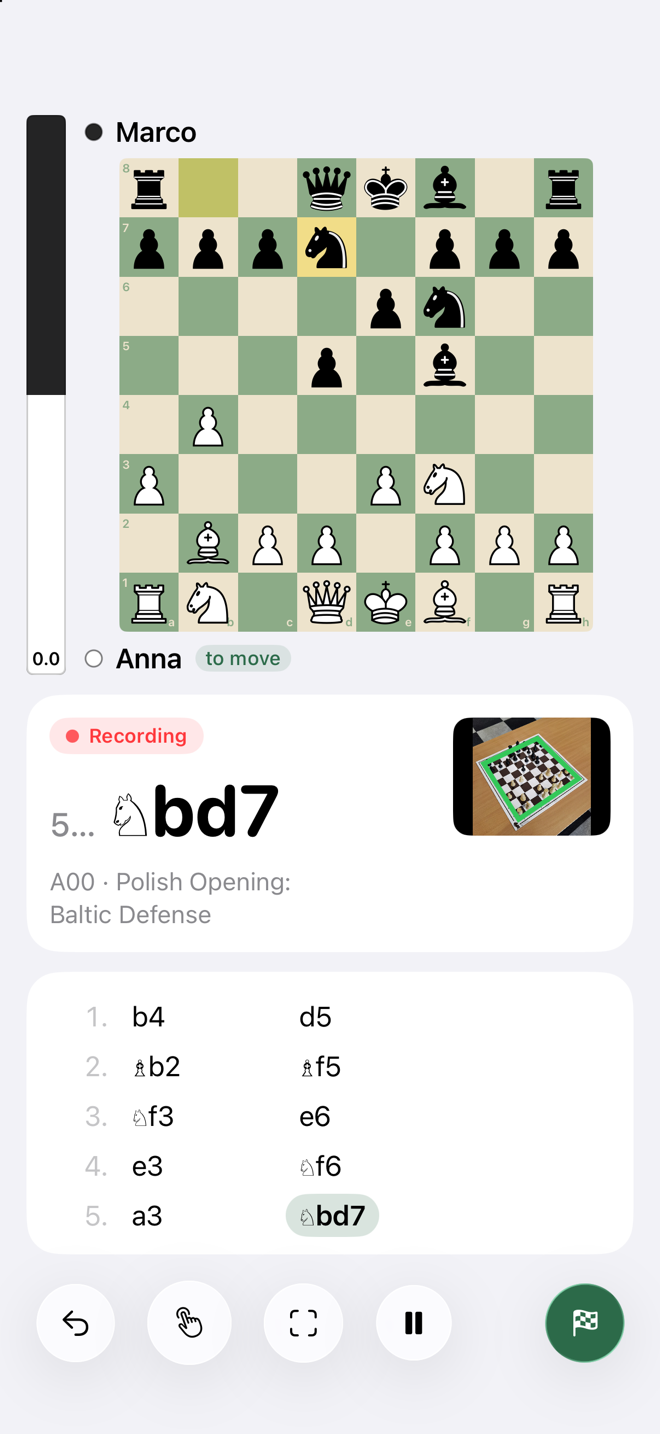
While recording, the phone shows a big board, the last move, the opening name and the captured pieces — handy for whoever is watching.
Moves announced
A short chirp per move, or spoken aloud — "knight f3", "castles kingside" — so you know it was recorded without looking. In English and German.
Enter a move by hand
Undo, pause, or type a move in yourself at any point. An interrupted game can be picked up again later.
Synced through iCloud
Your games and players are kept on your iPhone and in your own private iCloud. No Kibitz account, nothing on our servers.
Opening names
Every game is labelled with its opening — Queen's Gambit Declined, Philidor Defense — straight from the Lichess openings list, offline.
A look around
Your games, ready to look back on.
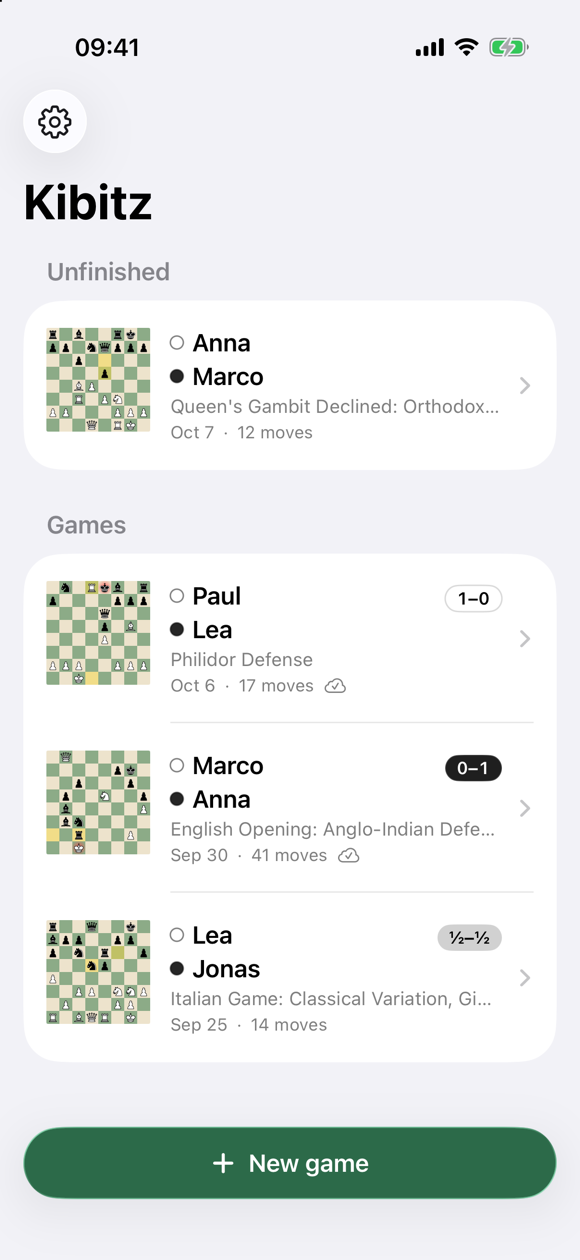
Every game in one list
The final position, the players, the opening and the result at a glance. Unfinished games wait at the top.
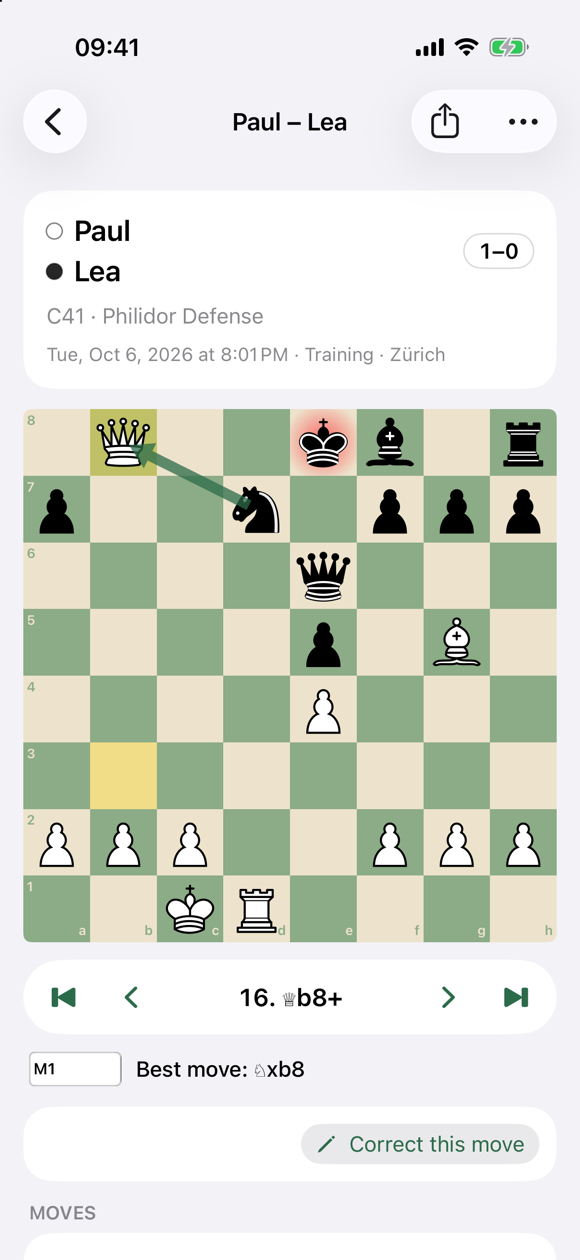
Step through the game
Move by move, with the photo taken at the time. With Pro, the evaluation and the best move for each position.
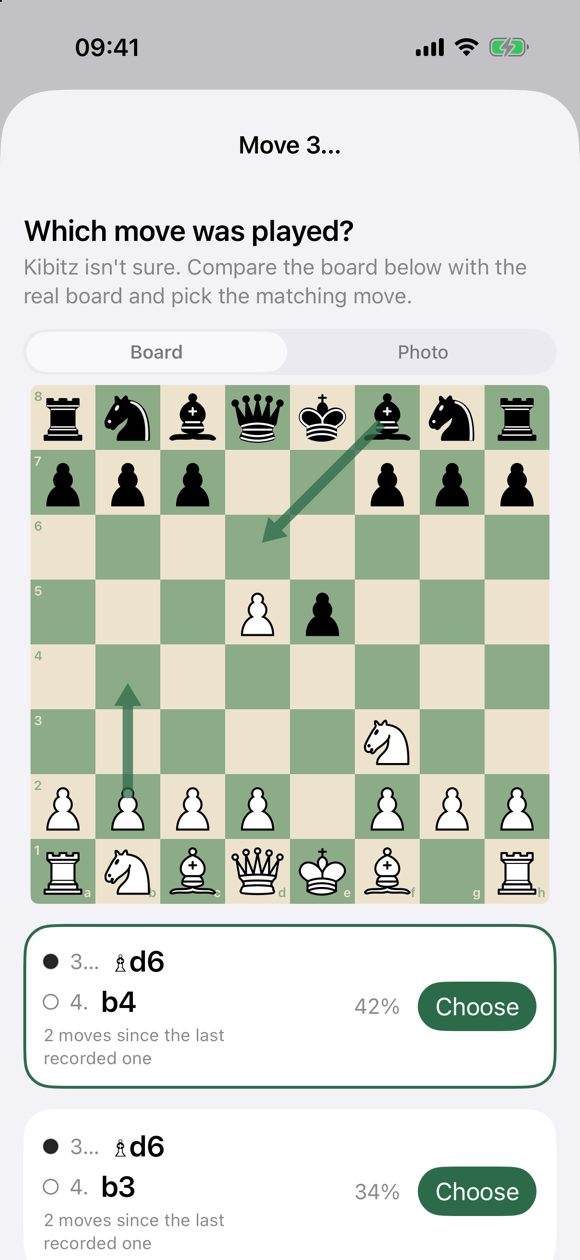
One tap when it's unsure
The likely candidates, most probable first. Pick one, or enter the move yourself if none is right.
Read this before you buy
What Kibitz can't do.
Better you know now than find out after paying.
It needs to see the board
Recognition works best with decent light and the whole board in view. In a dim room, with strong glare, or with an unusual set it will ask more often. It always tells you when it's unsure rather than inventing a move.
Games start from the initial position
Kibitz records games played from the normal starting setup. It doesn't yet set up a position from a photo of a game in progress or a composed problem.
Not for rated tournaments
Most tournament rules don't allow a phone at the board, and Kibitz is no exception. It's made for club evenings, training, lessons and games at home.
iPhone with iOS 26
Kibitz runs on iPhone with iOS 26 or later and uses the back camera. The phone has to stay still during the game — on a stand, a small tripod or leaned against something.
Pricing
Recording is free. Pro adds insight while you play.
Recording, reviewing, sharing and uploading games stay free, with no limit on the number of games and no ads.
Free
Unlimited games
- Recording with every move photo
- Review, correct, PGN export
- Upload to Lichess
Pro yearly
per year, renews automatically
- Evaluation bar and best moves
- Live broadcast on Lichess with a QR code
- Automatic upload into a Lichess study
- More board themes
Pro lifetime
one payment, no renewal
- Everything in Pro, for good
- For people who dislike subscriptions
Prices shown by the App Store in your local currency. Payment is handled by Apple — Kibitz never sees your card.
Questions
Reasonable things to ask.
Do I need a special board or pieces?
No. Kibitz is trained on ordinary Staunton-style sets on many different boards. A board with clearly contrasting squares and pieces is easiest to read.
Where exactly do I put the phone?
At the side of the board, between the two players and about an arm's length away, with the camera at roughly head height when seated and tilted down by 30–45°. No tripod? Lean it against a stack of books or clip it to a lamp — it only needs to stay still. The app shows a guide the first time and tells you when it has found the board.
What happens if it records a wrong move?
Usually it notices by itself: the next position doesn't match and it asks. If one slips through, open the game, step to the move — the photo shows what the board looked like — and correct it. The rest of the game is kept.
Do I need a Lichess account?
No. Uploading a game for analysis works without one. Signing in lets Kibitz put games into your own Lichess account and studies, and run a live broadcast.
Does it work offline?
Recording and reviewing work entirely offline. Uploading to Lichess, engine evaluations and App Store prices need a connection.
What data do you collect?
Nothing about you. There's no Kibitz account, no analytics and no tracking, and the camera picture is analysed on your phone. If you opt in to help improve recognition, the move photos of your games are sent without your name. The privacy policy explains that and what goes to Lichess.